Deploy any app

One chart.
Any app.

app-template is a ready-made Helm chart, the Kubernetes files that run your container, for any app on kinops: a website, an API, a worker, a cron job. Copy an example, set your image, push to Git, and ArgoCD deploys it.

Free in Community, the open-source pack, and in every other pack · Any Git host

The problem

Ten apps.
Ten Helm charts.

A Helm chart per app works, until you have ten of them. Each one is yours to write, review and keep up to date.

  • Copies that drift: Each new chart starts as a copy of the last, then every team writes it differently.
  • Templates to review: A dozen per app: Deployment, Service, route, probes, secrets.
  • Secrets wired by hand: Each app connected to the secret manager on its own.
  • Ten charts to keep up to date: By hand, one chart at a time.

The vision

What if every app used the same chart?

One shared chart, updated app by app through pull requests. Each app is a folder with one settings file, values.yaml, in the same shape every time.

Who it’s for

For teams that ship apps, not Helm charts.

  • Developers with a container image

    Ship it without writing a Helm chart: copy an example, set your image, push.

  • The one DevOps engineer

    Every app has the same shape. Review one values.yaml, not a dozen templates.

  • Teams with many services

    Ten apps on one shared chart, its updates as pull requests.

The solution

One chart to rule them all.

Seven examples to copy, one values.yaml per app, and the platform around it: HTTPS URLs, secrets, databases, monitoring and updates.

Setup

Copy an example.
Set your image.

Pick the example closest to your app and copy its folder into helm/apps/, in the Git repo your cluster runs from. Set its name in Chart.yaml and your image in values.yaml. No templates to write.

  • Your image: Its repository and tag, in values.yaml.
  • Its port: The port your app listens on, in values.yaml, if it serves traffic.
  • Its URL: For HTTPS, its name in cluster.yaml and in its route, in values.yaml.

Configuration

One file
describes your app.

values.yaml plays the part of your app’s entry in a Compose file: its image, env, health checks, secrets and URL, in a few lines.

  • Route: Your app’s URL, https://<name>.<domain>. For HTTPS, put its name in the route and in cluster.yaml, your cluster’s settings.
  • Probes: Health checks on a path of your app, such as /readyz.
  • Secret: An externalSecret block copies keys from Infisical, the secret manager in your cluster. Never in Git.
  • Database: Add the cnpg-cluster chart to Chart.yaml for a Postgres database. Your app reads DATABASE_URL from a secret.

Every kind of app

Websites to cron jobs.
Same chart.

Almost anything that ships as a container image. Each kind has a ready-to-copy example in the core repository.

  • With a URL: A website or an API gets an address in the cluster and a URL, served over HTTPS.
  • Without one: A worker, a cron job or a one-off job runs in the background, with no address to call.
  • With its own disk: A stateful service gets a volume per replica and a stable name.
  • On every node: A per-node agent runs one copy on every server.

Each example passes a strict schema check for Kubernetes 1.33.

GitOps

Push.
ArgoCD deploys it.

Commit the new folder and push. ArgoCD deploys each folder of helm/apps/, and keeps your cluster in sync with your repo.

  • Its own namespace: The folder’s name is the app’s name and its namespace, its own space in the cluster.
  • Roll back: Revert the commit, and ArgoCD puts the previous version back.
  • Any Git host: Your repo on GitHub, GitLab or any Git host. The included CI and its Renovate workflow run on GitHub Actions.
  • Delete to remove: Delete the folder and push: ArgoCD removes the app, its database included.

Monitoring and updates

Watched from day one.
Kept up to date.

Monitoring comes in every pack, wired out of the box: once ArgoCD deploys your app, its metrics and logs show up in Grafana. Updates come as pull requests.

With Enterprise, Argo CD Image Updater can deploy new image tags of the apps you choose, without a pull request.

  • Metrics and logs: Prometheus collects the metrics, VictoriaMetrics keeps their history, VictoriaLogs the logs.
  • Dashboards and alerts: Grafana shows your app next to the platform, and alerts you when it needs attention.
  • Updates as pull requests: Once you turn on Renovate, the update bot, it opens a pull request when app-template or your image has a new version: minor and patch updates grouped per app, majors on their own.
  • You merge: CI checks the change. Once you merge, ArgoCD deploys it.
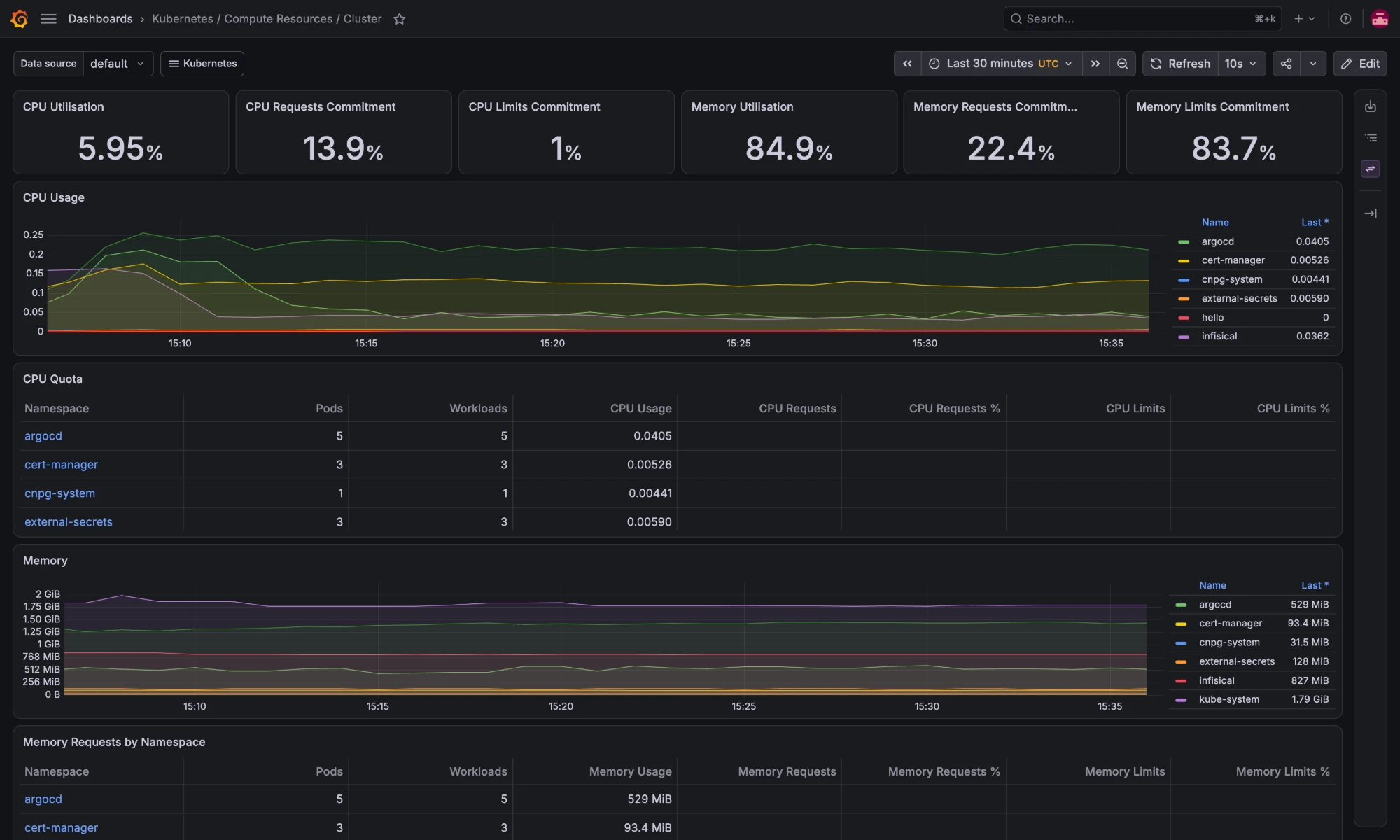
Grafana’s Kubernetes / Compute Resources / Cluster dashboard: the cluster’s CPU utilisation and CPU requests, and its CPU usage over time.

Why app-template

Less to write.
Less to keep up.

  • 7 examples: Ready to copy, one per kind of app.
    • frontend
    • backend
    • worker
    • cronjob
    • job
    • statefulset
    • daemonset
  • No chart to write: Copy an example, set the image and the port.
  • Same shape everywhere: Every app reads the same: easy to review and to hand over.
  • Secrets in one block: Synced from Infisical, never in Git.
  • One chart to update: Its version sits in each app’s Chart.yaml, updated by pull request.

app-template is a fork of the bjw-s app-template, made for the platform. You don’t have to use it: any Helm chart works in helm/apps/.

Get started

Your next app.
One push away.

Already on kinops? Copy an example into your repo, set your image and its URL, then commit and push. ArgoCD deploys it.

cp -r examples/app-template/frontend helm/apps/my-site
Read the deploy guide